Aloha!
Today we are going to go over the new Beam Boomer obstacle type we are almost finished implementing into Quaxum and the process and problems that come up with adding new features to your game.

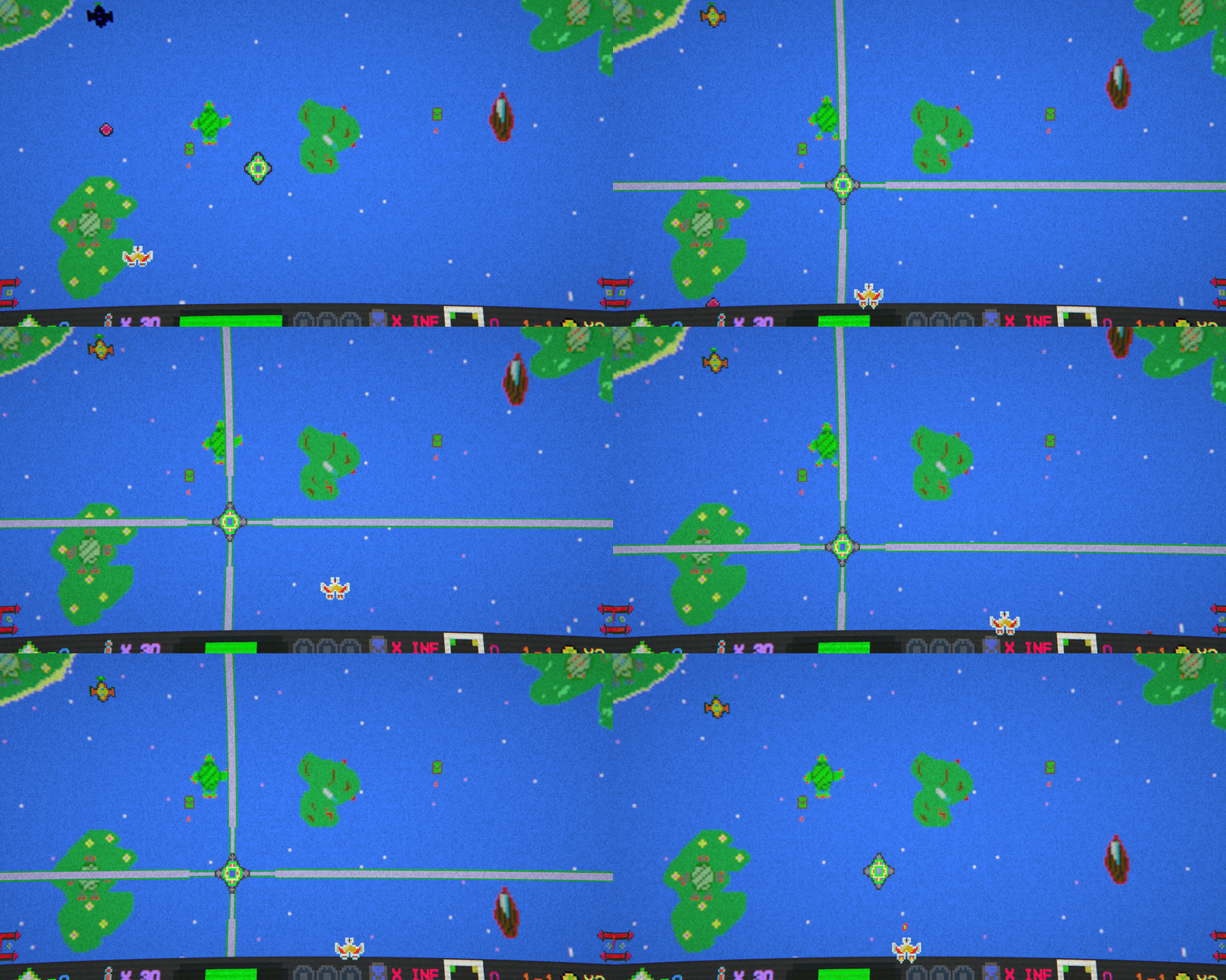
As you can see here, the Beam Boomer is an obstacle enemy that shoots beams out in all four directions.
But first of all, we want to go through and explain what the difference is between and enemy and an obstacle in Quaxum.
In Quaxum, we have two distinct but similar enemies.
- Ship Enemies
- Obstacle Enemies
The ship enemies are the main ones that are patterned on screen and descend onto the player in waves. They are the ones that damage the planet shield and are worth points.
Here is an example with the Galaxy Enemy type:
The obstacles are a class of enemy that spawn from the edges of the screen and are mainly there to be a nuisance to the player and stop them from attacking the ships. They don’t damage the planet shield and are not worth points. Instead, once they are destroyed they have chance to spawn a reward for that level.
Here is another example of an Obstacle class enemy: The Asteroid
Now that we have that out of the way we can begin to talk about the new Beam Boomer.
We originally came up with the idea to have a beam shooting from the side of the screen but we figured that would be too easy to dodge and wanted to ensure that the player really had to move around to get away from the beams. Now, the beams will trap the player into a quadrant on the screen which makes it much more difficult when there are ships firing and descending on the defense shield.
To implement this feature, we first though of animating the beam frame by frame but quickly realized that the beam will need to extend across the screen in varying lengths and an animation that long would be time consuming and laborious. So we decided to try a static sprite that we just scaled really long way past the screen so that no matter what the position the the beams were in they would always extend across the screen.
To do this, we created four child objects to the main prefab. They only had the sprite and box collider. We then created a for loop that iterated through the child transform list and converted it to the main GameObject array. Once we had the array we used out Beam Fire coroutine to turn on the GameObject which turned on the sprite and box colliders when fired and in reverse, turned them off when the firing was over.
It worked great on the first try!
Here is a snippet of the For Loop code:
The code is in the Start function as we need this to happen only on the creation of the object. We are trying to be mindful of optimization even though our game really won’t need to worry about it. But if we had this constantly in Update it would be doing unnecessary calculations when we just need it once. We are trying to keep and build good habits for future games.
We then went and added some animation to the beam boomer so that as it moved around the little cannons moved and then extended when firing.
Thankfully, we had already scripted an Obstacle Class that handled the random movement for the Beam Boomer so we just had to focus on this unique obstacle feature.
We were actually amazed at the ease and speed of conception and then implementing the Beam Boomer. The most difficult part was figuring out the for loop and converting the transforms to a GameObject array. Everything else was a cake walk! Well until we discovered an issue…
Here is the Beam Boomer without the beams:
Here is the Boomer animating when firing:
Here is the Beam Boomer when it moves:
It pulsates with the arms moving in and out when moving and then statically having the arms extended when firing.
Now, there were still issues that arose. One big issue is the flash code for when it is hurt stopped working. This code is in the base obstacle class that every obstacle belongs to. Before we animated it, it worked just fine but for some reason we are investigating the flash stopped working. The code still fires as we can see in the debug but sprite renderer doesn’t seem to change to red. Which is odd as there is nothing in the animation that overrides the sprite renderer’s color so it should in theory work.
This is what the object is supposed to look like when hit:
But it now just stays the original color. So we are going to continue to investigate the issue. Because the player needs that visual feedback to see when the enemy is hit otherwise the bullets just disappear and it looks like there is no damage being done.
This is one of the issues of writing class scripts for types of objects in the beginning. You try to come up with all potential use cases like movement, health and damage functions but it is hard to predict where the game will go and what new types of features you will need. And with that, you run into unforeseen compatibility issues.
For another example, with the base obstacle class we have the random movement code for the asteroid. When we reused that for the new Beam Boomers we noticed that there was no easy way to stop it from random movement. Which was an issue as we originally wanted the boomer to stop when it fired. But to do so now we would have to either add a bunch of new code or modify the existing code and hope it didn’t break the functionality. Because in the beginning when we wrote the movement code originally we never thought about needing it stop and be static.
So we were forced to have the boomer move while it fired so that we didn’t have to modify the code.
Here is an example of the Random Movement code:

Above: You see two Coroutines.
The RandAst() will run and determine randomly which direction the asteroid will move next.
The MoveAst() then takes that random direction and converts it to a vector2. Then takes the vector2 and applies force in that direction.
These two functions combined are what the obstacles use to move. So if we use this code then we are stuck with a random movement. Which is okay as we planned to have our obstacles for the most part to move randomly. But you can see here there is no future proof for a dedication direction or a way to stop the movement.
And that brings us back to hurt flashing code. It was originally coded with just asteroid in mind as that was the only obstacle we had created. But now that we needed to reuse that code it for some reason is not working when the object animates. The asteroid is controlled by code to rotate so we didn’t have to animate pixel rotation. And the flash code worked with that. We never tested the code on an actual animation frame. We didn’t think we needed to. And now that is an issue.
Flash Code Snippet:
And an example of what the code is supposed to do GIF:

As you can see, the SpriteRenderer color property will change to red and back to white rapidly. Which in theory should work on the animation as well. As you can see in the code it just changes the color property and none of the Beam Boomer animation uses that property so it should not be overridden by it. Which means we are confused onto where the issue lies.
Here is the Asteroid rotating through code GIF:

And the Code that rotates it:
As you can see above, the asteroids rotate by code and not through animation. And the code is pretty simple, if the object is an asteroid type and still alive Rotate it based off the defined astRot variable. This code runs in Update so that it happens every frame. This way we have control over the speed in the editor and can fine tune it. Or, change the variable around through code if we ever came up with a feature that needed to. Future proofing when it works!
But also you can see how the rotation code also doesn’t affect the color property and the flash code works just fine on it. And you can see how we tested the flash code on the rotating asteroid and never figured it would cause an issue later down the line.
And it theory it shouldn’t. But yet, it does. Oh the woes of game development, and software development in general.
Now, all of this planning, executing, testing and troubleshooting is all part of the process but it goes to show just how much you need to plan out your code base and try to future proof it. But also recognize that there will be troubleshooting needed and modification of the code down the line as the development progresses and your mechanics expand.
As we wrap up this article we want to show you the current version of the Beam Boomer in action:

More to come as we investigate the hurt code issue and finish up this enemy type.
We hoped you enjoyed this almost post mortem on the Beam Boomer.Because if it wasn’t for the flash code issue, this would be a post mortem!
Come Check out Quaxum on Itch and see more!: Quaxum on ITCH!
And our new website: Alympyan Arts